

Windows is a Microsoft product that many people use on a daily basis for home and office use. At present, Windows 11 is in use and it offers productive features which people use to complete their work. Whether you are a student, teacher, or working professional, Windows 11 is a complete package that you can use to learn things, complete college projects, or finish office tasks like writing, finance, coding, printing, etc. Its UI is simple and easy to adopt… but one thing is frustrating… it is the everyday update!
Once upon a time, Windows updates (e.g., Windows 95, 98, ME, 2000, XP) were minimal… they occurred once every 3-4 months… but nowadays, if you have Windows 11 on your device, you will find it updates daily. When this happens, it consumes a lot of mobile data. People do not like this because they have limited mobile data per day, such as 1.5GB/day, 2GB/day, or 3GB/day. So, while using Windows 11 on your PC, if it is connected to mobile Wi-Fi, you will notice the mobile data is consumed 100% within few hours. The reason is that Windows 11 has received a new update because the update feature is turned ON. This spoils the mood because now you have 0% mobile data and all of your work is pending!
Is there a solution to fix Windows 11 system updates?
As shared by a user on Reddit, Windows updates are necessary as these keep your PC secure from bugs. New updates optimize PC performance, offers new features, provide stability, and fix a number of security related issues.
Turning Windows update OFF permanently or for longer period would be a bad move because it can downgrade your PC’s performance, leave your device vulnerable to attacks, slow down its speed over time, or cause some apps to not work smoothly.
What is the solution?
Though frequent Windows system updates are not necessary, the solution is not to update Windows 11 every week. Schedule a day – it could be a holiday or Sunday – and on that day you can turn on the updates. For the rest of the days, you can keep Windows 11 updates turned off.
As a broadband user… keeping Windows 11 system updates turned on is not a big deal because broadband providers like Airtel, Jio, Weebo, ACT offer unlimited internet. However, sometimes if you are traveling and mobile data is your only option, then keep updates turned off for a few days or a week, and it would be a smart move.
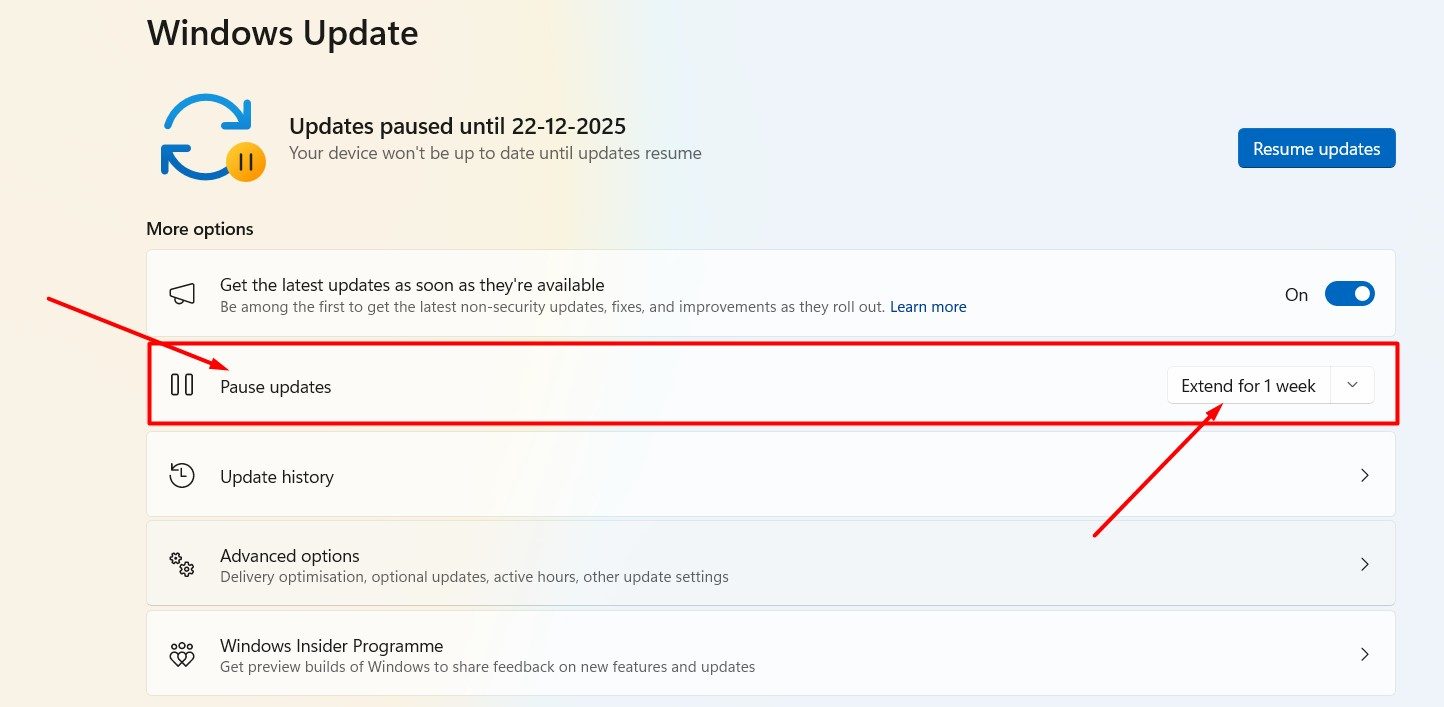
Here’s how to turn off Windows updates on Windows 11:
- Go to the Windows search bar (available in the taskbar).
- Search for Windows Update.
- The Windows Update settings will open, and here you can pause updates for up to 1 week.
- Keep clicking this (pause updates) section, and the update date will extend further.
- This way you can extend the pause and ensure that when the extension ends, you have unlimited data.
Note: If unlimited data is not available on that particular day, you can again extend the update pause for 1-2 weeks!
This is the best way to keep Windows 11 updates paused for a week or a month. By doing this, your mobile data will not be exhausted, and you can use it for productive work like learning, completing office tasks, or for personal use (entertainment, banking, online shopping, payments, etc.).
This is a very simple and effective solution. If you liked it, please share it with others on social media channels and don’t forget to share!